The specs that actually decide this
| Product | Channels | Power per channel | Video / HDMI | Room correction | Price |
|---|---|---|---|---|---|
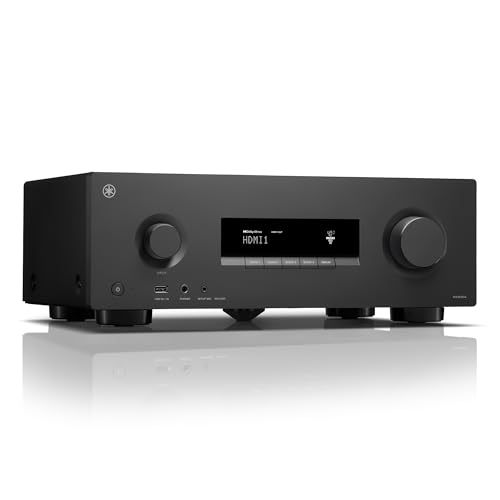
| Yamaha RX300A 5.2-Channel Home Theater AV Receiver | 5.2 | 70W | 4K/120, 8K/60, HDMI eARC/ARC, ALLM, VRR | Included setup microphone | Check price on Amazon |
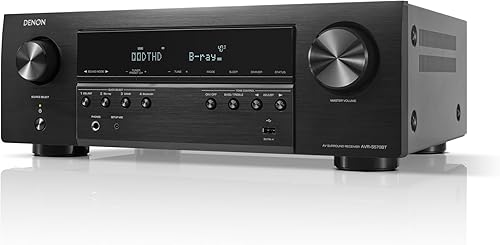
| Denon AVR-S570BT | 5.2 | 70W | 4 HDMI 2.1 8K inputs, 1 output, eARC to 40 Gbps, VRR, QFT | Not stated | Check price on Amazon |
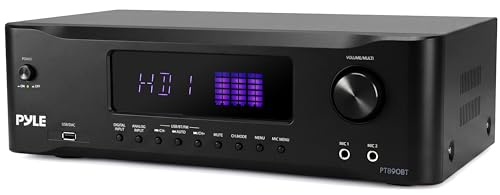
| Pyle 9.1 Channel AV Receiver | 9.1 | Not stated (Class D) | HDMI 2.1, 8K/4K pass-through | Not stated (built-in DSP) | Check price on Amazon |
| Onkyo TX-NR7100 | 9.2 | 100W | 3 HDMI outputs, 8K/4K at 40 Gbps, 4K/120, VRR, ALLM, QFT | Dirac Live, wired mic included | Check price on Amazon |
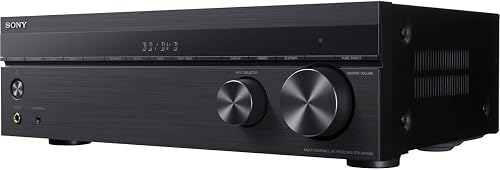
| Sony STRDH590 | 5.2 | Not stated | 4K HDR pass-through, HDCP 2.2 | Not stated | Check price on Amazon |
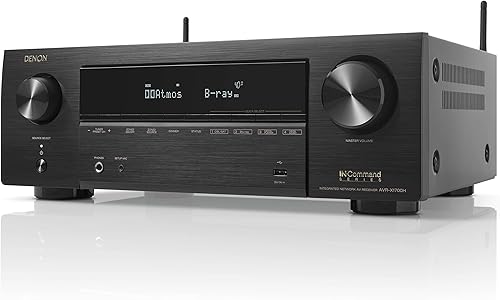
| Denon AVR-X1700H | 7.2 | 80W | 3 8K inputs, 1 output, 8K/60 and 4K/120, 8K upscaling on 6 inputs | Not stated | Check price on Amazon |
Quick answer: Pick your receiver by counting the speakers you'll actually connect and the HDMI devices you'll actually plug in — everything else is marketing. A 5.2-channel receiver like the Yamaha RX300A covers a standard surround setup with Atmos height duty, while 7.2 and 9.2 models only earn their price if you're running rear surrounds or ceiling speakers. Room correction matters more to how it sounds than watts do.
Start with channels, not watts
The channel count is the single number that constrains everything else. A 5.2 receiver drives five speakers plus two subwoofer outputs — front left/right, center, two surrounds. That's the layout most living rooms end up with, and it's why the Yamaha RX300A 5.2-Channel Home Theater AV Receiver with Dolby Atmos, 4K120/8K HDMI and Bluetooth Multipoint (Black) is a sane default at $399.95. Yamaha lists 70W per channel and flexible layouts including 3.1.2 — meaning you can trade the rear surrounds for two up-firing or in-ceiling height speakers and get real Dolby Atmos out of five amps.
That trade is the crux of the whole decision. If you want Atmos height channels and rear surrounds simultaneously, five channels can't do it, and you're shopping 7.2 or 9.2.
The best how to choose an av receiver for your situation depends on how you plan to use it and where.
Power figures are less useful than they look. The spread here runs 70W to 100W per channel, and that gap is small in perceived loudness terms. Your speakers' sensitivity and your room size affect volume far more than the difference between a 70W and 100W receiver. Don't pay for watts you can't hear.
Room correction is the underrated feature
Every room ruins sound in its own way — bass piles up in corners, a bare wall throws a reflection into your ear a few milliseconds late. Room correction measures this with a microphone and compensates.
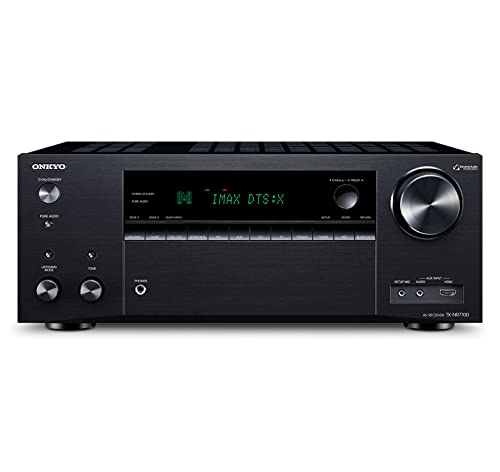
The Yamaha RX300A includes a setup microphone that measures room acoustics and speaker characteristics to automatically optimize performance. The Onkyo TX-NR7100 9.2-Channel AV Receiver - 100 Watts Per Channel, Dirac Live Out of Box, Works with Sonos Certified, THX Certified and More ships with Dirac Live and a wired mic, and also supports calibration from a PC or macOS app with a third-party USB mic. Dirac Live is a genuinely more sophisticated system than what most receivers include at any price, and if you care about accuracy in an awkward room, that's the strongest argument in this whole list for spending $749.00.
The Denon and Sony models here don't state a room correction system in their specs. Denon does list an on-screen setup assistant with EQ settings on both the AVR-S570BT and AVR-X1700H, which walks you through connections and optimization — helpful, but check the listing if automatic acoustic measurement specifically is what you're after.
Count your HDMI ports before you decide
This is where people get burned. A game console, a streaming stick, a Blu-ray player and a cable box is four devices — and receivers vary a lot here. The Denon AVR-S570BT lists four HDMI 2.1 8K inputs and one output. The Denon AVR-X1700H lists three dedicated 8K inputs and one output, with 8K upscaling on all six inputs. The Onkyo TX-NR7100 offers three HDMI outputs, which is unusual and lets you feed a second zone at up to 8K60.
Also check for eARC. It's the feature that sends full-quality audio back from your TV's apps to the receiver over one cable. The Yamaha, both Denons, and the Onkyo all list it.
Who this class of receiver is for
Buy a mid-range AV receiver if you have — or plan to buy — actual separate speakers. That's the entire point. It's the hub that switches video, decodes surround formats, and drives passive speakers.
It's also the right call if you game on a current console. The HDMI 2.1 features matter here: 4K/120 pass-through, VRR to kill frame tearing, ALLM to auto-switch to low latency. The Yamaha RX300A, both Denons, and the Onkyo TX-NR7100 all list some combination of these.
And it fits if you want one box to also handle music. Bluetooth is on every model listed. The Yamaha adds Bluetooth Multipoint, which pairs two source devices and switches between them instantly — a small thing that stops being small when two people keep swapping phones.
Who should skip an AV receiver entirely
If you're not going to run speaker wire, skip it. A receiver with no speakers attached is an expensive HDMI switch. Buy a soundbar instead — you'll get more sound per dollar and none of the setup.
Skip it if your room is small and you sit close to the TV. Surround separation needs distance to work; in a bedroom, a good stereo pair or a soundbar usually wins.
Skip the 7.2 and 9.2 models if you're not placing seven-plus speakers. You're paying for amplifier channels that will sit unused for the life of the unit. Buying "for later" mostly means buying a receiver that's three HDMI generations old by the time later arrives.
The honest trade-offs
Channel count versus price. The Pyle 9.1 lists nine channels at $249.99, while the Onkyo TX-NR7100 lists 9.2 at $749.00. Those numbers are not comparable in isolation — the Onkyo specifies 100W per channel and Dirac Live, while the Pyle's per-channel power isn't stated. Channel count is a spec, not a quality rating.
8K versus what you own. Most people don't own an 8K display and won't soon. The reason to care about 8K-capable HDMI is that it usually comes bundled with the 4K/120 and VRR features that current consoles actually use.
Future-proofing is mostly a myth. HDMI standards move. Spend on channels and correction you'll use now.
Streaming built in versus not. The Denon AVR-X1700H lists built-in HEOS, AirPlay 2, Wi-Fi and Alexa voice control. The Onkyo lists Spotify, TIDAL, Deezer, TuneIn and Pandora plus Sonos certification. The Yamaha, Sony and Pyle list Bluetooth. If you already own a streaming stick, Bluetooth-only is fine and saves money.
What to check on the listing before you buy
- Current price. Every price here is a snapshot. Receivers discount hard and often; verify before you click.
- Variant. Check you're on the color and model you meant — the Sony STRDH590 is listed in black, and receiver families use confusingly similar model numbers.
- Warranty and what's in the box. The calibration microphone is the item to confirm. Yamaha and Onkyo both list an included mic; Onkyo notes a third-party USB mic is not included for the PC/Mac Dirac route.
- Owner reviews. Read recent ones yourself, filtered to the last few months, and look specifically for HDMI handshake complaints — that's the failure mode that turns a good receiver into a daily annoyance.
- Return window. Confirm it, because room correction results are the thing you can only judge at home.
Consider these instead if…
Denon AVR-S570BT AV Receiver 5.2 Channel 8K Ultra HD Audio & Video, Stereo Receivers, Denon AVR Wireless Streaming Bluetooth, (4) 8K HDMI Inputs, eARC, HD Setup Assistant — consider instead if…
…you have four HDMI sources and don't want to compromise. The Denon AVR-S570BT lists four 8K HDMI 2.1 inputs — the most inputs of any 5.2 model here — plus 70W x 5, eARC up to 40 Gbps, VRR and QFT for gaming, and DTS-HD Master and Dolby TrueHD decoding. At $449.00 it's the port-count pick, and the on-screen HD Setup Assistant makes first-time setup less painful.
Onkyo TX-NR7100 9.2-Channel AV Receiver - 100 Watts Per Channel, Dirac Live Out of Box, Works with Sonos Certified, THX Certified and More — consider instead if…
…you're building a full Atmos layout or running multiple zones. The Onkyo TX-NR7100 lists nine channels of processing, 100W per channel, three HDMI outputs with discrete Zone 2 switching, and Dirac Live room correction out of the box. It's THX certified and Sonos certified — it can work with up to three Sonos Ports, one per zone. At $749.00 it's the most capable box here by some distance.
Denon AVR-X1700H 7.2 Channel AV Receiver - 80W/Channel, Advanced 8K HDMI Video w/eARC, Dolby Atmos, DTS:X, Built-in HEOS, Amazon Alexa Voice Control — consider instead if…
…you want height channels and rear surrounds without jumping to nine. The Denon AVR-X1700H lists 7.2 channels at 80W, three 8K inputs with 8K upscaling on all six inputs, Dolby Atmos, DTS:X, DTS Virtual:X and Atmos Height Virtualization for rooms where ceiling speakers aren't happening. Built-in HEOS, AirPlay 2 and Alexa control make it the strongest streaming option listed, at $699.99.
Sony STRDH590 5.2 Channel Surround Sound Home Theater Receiver: 4K HDR AV Receiver with Bluetooth,Black — consider instead if…
…you're starting with just two speakers. The Sony STRDH590 lists S-Force PRO virtual front surround, which creates a surround effect from a two-speaker setup — useful if you'll add speakers gradually. It also lists 4K HDR pass-through with HDCP 2.2, Bluetooth Standby to wake the receiver from your phone, an FM tuner and a 1/4-inch headphone jack. Note it doesn't list Atmos or 8K, so it's the conservative choice at $498.00.
Pyle 9.1 Channel AV Receiver | Audio Amplifier with Subwoofer Output, HDMI 2.1, Bluetooth Streaming | Surround Sound System for TV, Home Stereo Receiver for Home Theater. — consider instead if…
…budget is the binding constraint and you want maximum channels for the money. The Pyle 9.1 Channel AV Receiver lists nine channels of Class D amplification, a subwoofer output, HDMI 2.1 with 8K/4K pass-through, Bluetooth streaming, and optical, coaxial, USB and analog inputs, plus built-in DSP and an LED display. At $249.99 it's the cheapest entry here — just note that per-channel power and room correction specifics aren't stated, so read the listing carefully.
FAQ
Do I need 8K if I don't own an 8K TV? Not for the resolution. But 8K-capable receivers here — the Yamaha RX300A, both Denons, the Onkyo, the Pyle — generally bundle the HDMI 2.1 gaming features like 4K/120 and VRR that current consoles do use.
Is more power always better? No. The range here is 70W to 100W per channel, which is a modest difference in practice. Speaker sensitivity and room size dominate. Put the money into room correction or channel count instead.
Can I get Dolby Atmos without ceiling speakers? Yes, in two ways. Up-firing speakers bounce sound off the ceiling — the Yamaha RX300A supports a 3.1.2 layout with up-firing or in-ceiling heights. Or use virtualization: the Denon AVR-X1700H and the Onkyo TX-NR7100 both list Dolby Atmos Height Virtualizer, which simulates height from a conventional layout.
How many subwoofer outputs do I need? One is enough for most rooms. Two — the ".2" in 5.2, 7.2 and 9.2 — lets you place subs in different spots to smooth out bass response. It's a real improvement in problem rooms, and every model here except the Pyle 9.1 lists dual sub outputs.
Related guides
- How To Set Record Player Weight (2026)
- Alternative Options for Best home audio and home theater - bluetooth speakers, soundbars, AV receivers, turntables and record players
- Expert Advice on Best home audio and home theater - bluetooth speakers, soundbars, AV receivers, turntables and record players
Key Takeaways
- Choosing the right how to choose an av receiver means matching the key features to your specific needs and budget
- Read real customer reviews and check the return policy before you commit
- Compare value across models — the priciest option is not always the best fit